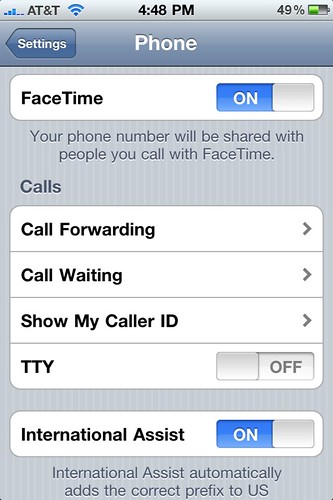
I discovered today that FaceTime didn’t work on my iPhone 4: people couldn’t start FaceTime calls with me and I didn’t have any of the FaceTime buttons present. Turns out that this problem is caused when restoring from an iPhone 3G running iOS 4 — it seems the FaceTime on/off setting is imported from the iPhone 3G (which has it turned off as it doesn’t support FaceTime). Going into Settings > Phone and then flipping FaceTime on solved it for me.
Other people seem to have had to jump through a couple of extra hoops to get this to work, if flipping the switch didn’t get you going, take a look at this post over at the Rusty Brick blog.
Update 2010-08-22: Still having trouble? Did you jailbreak your iPhone 4? There’s something else that might stop this working too.
Update 2011-08-20: Did you find this post helpful? It would be awesome if you’d take a moment or two to check out File Sanctuary, my hosting company. We’d love to help you with our cloud servers, web hosting, email hosting, radio station hosting, domain registration, SSL certificates, and Livedrive cloud backup. We really care about the service we provide, and we’re fairly priced. Have a look around our website to find out some more, then get in touch and tell us what you’re after, and we’ll do everything we can to accomodate your needs. Thank you for reading my shameless plug! :)
Update 2012-07-18: Several people have reported that the FaceTime icon disappears after you have done the initial setup, and that this is normal. To make a FaceTime call once setup is complete, go into your Contacts, find the person you want to video chat with, then you should see a FaceTime button underneath their contact info, in the same ara that the “Text Message” button is. Thanks to everyone who’s commented for sharing their stories!
I too found that my FaceTime is missing. Except that its slightly different from your case. My FaceTime settings disappeared mysteriously! In the end I found out that its because I have JB my phone and have not did a Cydia update yet.
So if you find that your FaceTime settings is missing after you jailbreak, you can get it back at http://igeeksfaq.blogspot.com/2010/08/iphone-facetime-problems.html
I’d heard jailbreaking could affect FaceTime, but didn’t experience that problem myself — now I know it’s because I ran that update straight after running the jailbreak. Thanks for the additional info! :)
Hi,
I have got a new Iphone 4 without Facetime included ,is there a way to add this application again to my iphone?and how
@yazan: All iPhone 4s come with FaceTime. Please read my post for the instructions.
thx a lot Aaron, thx google, i found it!
I have the solution!!!! I think… Some people like me don’t have the option in settings anymore to toggle on/of facetime on jailbroken Iphones. No need to restore. Just go to savemode when turning of your Iphone. Go to settings and the opttion to turn of facetime is there! Spread the word!!!
how do i enter my iphone 4 in save mode???? sorry to ask :)
@CoinOp! after the phone is in save mode what do you do??? I tried in my iphone 4 and still no option to turn it on??? please help!!
@odali Normally you’ll only get there if something goes wrong with MobileSubstrate, I think. Safe Mode isn’t part of un-jailbroken iPhones (because MobileSubstrate isn’t there normally), but if you’re jailbroken, install SBSettings, it has a way to force Safe Mode, under the power setting I believe. I’m not jailbroken right now so can’t check myself.
@Aaron B. Russell, thanks, I found an app in cydia that set my phone to save modem but I still cannot see the facetime on/off slider in settings> phone. By any chance do you know any fix for that issue
@odalis: Have you tried the suggestion at the link that Dan Ang posted above?
In setting face time option is missing I can’t flip on/off button even in restriction my FaceTime is on. My phone is cydia unlocked. Any suggestion or help
Hi, yes
I just got a new iPhone 4 the white one and its not jailbroken but for some reason I went to the settings to activate facetime but the switch isn’t there…. So can’t activate it and on top of that I updated it to the latest version, can anyone help me on how to solve this?
Thanks
Hey
Mine is afactory unlocked iphone. my face time icon has disappeared under mysterious conditions. in fact i bought it in Doha and was using facetime there. now i mooved to india and using vodafone and i dont find the Facetime On/Off button in settings-phone menu. please help. But i have another phone bought in doha being used here which has the Facetime Options.
Hi Aaron,
Neat, many thanks for taking the time to post this, it fixed my issue.
hi all I found an app in cydia that set my phone to save modem but I still cannot see the facetime on/off slider in settings> phone. By any chance do you know any fix for that issue
My face time icon is missing and I only got my phone two days ago I have the iPhone 4 pls help me I just want it back on my screen .it stills work but only when making a call
unblocked iphone4 purchased in dubai one month back now used in india no facetime icon found pl help
hi,
i dont have facetime on my iphone 4 , i checked settings and i couldn’t find it , i couldn’t find it anywhere !!! PLEASE HELP !!!
justin :)
Thanks so much for having the answer to this I have been working on this for days and just spent chatting with an At&t person who had no clue what to do!!
Now to call time warner to get the home phone working…gotta love technology!
Thank you so much. Just back from Ireland and no FaceTime to catch up with my family abroad…. Was NOT happy.Thank you so much
Worked like a charm. Thanks so much.
Mark
Thank you so much! I upgraded to iOS 4.3.5 and it seems it shut off my facetime. I went to make a “call” and it was gone. Didn’t even think to go in to settings until I saw this site. I can’t thank you enough. That’s the nicest feature in the iPhone4 and I thought I’d lost it!
Facetime is blocked in UAE and it does not appear on my phone as well. how to get back facetime.
regards
Sheeraz
i upgraded my iphone4 to ios5 and facetime is missing please how an i get it back to my phone.
i bought a iphone 4s no facetime i followed the rusty brick instructios after yours and still nothing any more ideas?? ive met 2 different people with no face time or facetime settings in theyre phone
You know, most iphone 4s doesn’t have facetime icon on the screen.
Setting -> Phone.
Under there you wont be seeing Facetime (on/off) setting.
Because Under setting, right below phone setting, is facetime setting.
When you want to contact someone through facetime, just go to
Contact, select a phone number or email, and click on facetime logo/logo/name or whatever it say, thats it.
i bought i phone 4 and face time is not there i checked every where but not there how i can fix please help me to short out this thanks
upgraded my iphone4 to ios5 and facetime is missing please how an i get it back to my phone.
I just got mu factory unlocked iphone 4s. my face time icon has disappeared under mysterious conditions. O tríed reset in general settings and nothing happened. Help please
Mine is afactory unlocked iphone. my face time icon has disappeared under mysterious conditions.
As someone mentioned above, Once you have set up your Face Time from the icon on the app screen (adding your email/phone) the icon will disappear. Then you go to your contacts and at the bottom of the contacts you will see an option to call someone by tapping on the Face Time button. It will then give you an option to contact them via their email or telephone number.
why i don’t have facetime in my contacts even in my phone settings?…pls help
Hey,
Well i did look in phone and everywhere i dont want to like jailbreak it or reset it because it got handed to me by my mum and its a iphone 3gs i dont know what to do because i looked everywhere now i got facedial but it wont work like my besties who has got a ipod touch help me pls!
I buy iphone 4s bt in my iphone 4s no facetime and i checked setting>phone every where i did not find facetime option pls help me and tell me how to fixed facetime in my iphone 4s
Do not buy an iphone from places like dubai, uae. Features like Facetime are blocked by the Government to protect monopoly semi-government communications companies (like etisalat). Funny thing is that google talk, msn, yahoo messengers etc are allowed, but not face time in the iphones. Shouldnt apple fume and stop selling it’s limbless product rather than dancing to dictatorial tunes ?
Do not buy stuff from Dubai without checking the specifics. Lot of catches and conditions beneath the glitter.
To answer your question, there are two versions of iphone 4s available in dubai. As I understand the official one with official warranty has Facetime and Imessage blocked / not loaded. This is at the request of the Telephone authority. This is to protect the local monopoly companies called Etisalat and Du, mainly etisalat , which is semi – Government. They felt facetime would creep into their international phone call profits (Due to the very high call rates of etisalat – the market is flooded with voip software anyway, nobody calls international much, still they had to show their muscle power on iphone). Also, I heard imessage is absent in iphones here. It does what an sms does. So, ditto – blocked.
The other ones with facetime and all is available but with questionable warranty – They say shop warranty and apple warranty. Not too sure on either. Unlike a standard phone, it is better to buy a smartphone with warranty, atleast until software solutions become do-able by any shop. Now, it isnt – they will say they can and mess it up.
Apple isnt helping either – They dont advertise directly, nobody knows whether there is an Apple office / Main agent in dubai. You know where to go with a sony or a samsung if you got a prob. Apple is everywhere but nowhere. Easy to buy, but difficult, if you got a problem.
Best option is to buy a free version – like US or UK or version from a safe online seller with international apple warranty.
Hi everybody
I have facetime problem too, in my phone iMesseage is active and work verywell and isn’t facetime menu in setting, i bought my phone in iran but this release from UAE
please help me to resolve this problem
OK here is how to fix this for iPhone 4 s
Go into settings —- scroll down and you should see FaceTime ( underneath phone)
Click on that
Then you will see option to run on and off FaceTime turn on and off again and then it will work when people call you.
@CEF Your missing the point! there is NO FACETIME SETTINGS to start up with !!
the whole thing is missing!
Any one found a solution? mine was there before i upgraded to 5.1.1!
I have the same problem.
iPhone 4 with iOS 5.1.1 (no Jailbreak and factory unlocked) also with no Facetime available in contacts that I am sure they can use Facetime.
No Facetime activation button available in Settings / Phone.
Tried all possible resets and still not available.
My iPad 2 and my iPod Touch can use Facetime and they are on iOS 5.1.1.
Did someone solved this issue? In Apple forums there is no help or feedback about this.
=== SOLVED ===
As reported above, icon disappears once Facetime is setup. Check Settings->Facetime to make sure Facetime is ON, then initiate a call from the Contacts app.
Suggestion to blogger, remove all the posts except the best solution(s) to save people’s time sorting through. Google ranks this page highly.
Hi Eric, I don’t want to delete anyone’s comments, but I have gone and edited the post to link to the relevant comments you were referring to — hopefully that’ll make it a little easier for people to jump straight to the useful info. :)
Hi guys ! many people have the same problem as i do —->” no facetime on/off button in settings ” i have an iphone 4 and i updated it to IOS 5.1.1 but still no facetime button . and no one answered to the question . PLZZ if someone knows how to fix it help me fix the prob and thank you
Hi I bought my iPhone 4s from du and when I checked for FaceTime there is no option I don’t have face time in my phone can any one help me to get facetime
I have an iPhone 4 too and my FaceTime is also missing, I can’t find it anywhere, even in phone settings! I tried to restore and reset it already! What else should I do? Pls help!
hey i bought my iphone 4 from dubai and its running ios 6.1.2 but there is no facetime option anywhere, not in settions nor in the phone and its not evn der in d restrictions ..plz help wat m i supposed to do ? i did nt back up frm a 3gs or smtn like that !!
P.S NOTE : THERE IS NO SUCH OPTION AS FACETIME ANYWHERE
but i updated it with indian ios 6 nd using it on airtel network 11.1 with 3g
I am missing the FaceTime app on my new iPhone for S . How do I fix this
When I go into settings and go on phone it doesn’t even say face time
problem solved on jailbroken iphone
just go to cydia and search for “middlewhat” and instal it. after a restart you can see both facetime in settings and your contacts.
worked well on my jailbroken iphone 4s
I am in Afghanastan and before I left home my husband and I purchased iPhone 4S for each of us for the sole purpose of using Facetime. It woeked fine and then suddenly the icon disappeared off the contact list. I am unable to use it anymore. It started off working so what is the issue. My phone was never jailbroken or anything and other peoples iphones still work